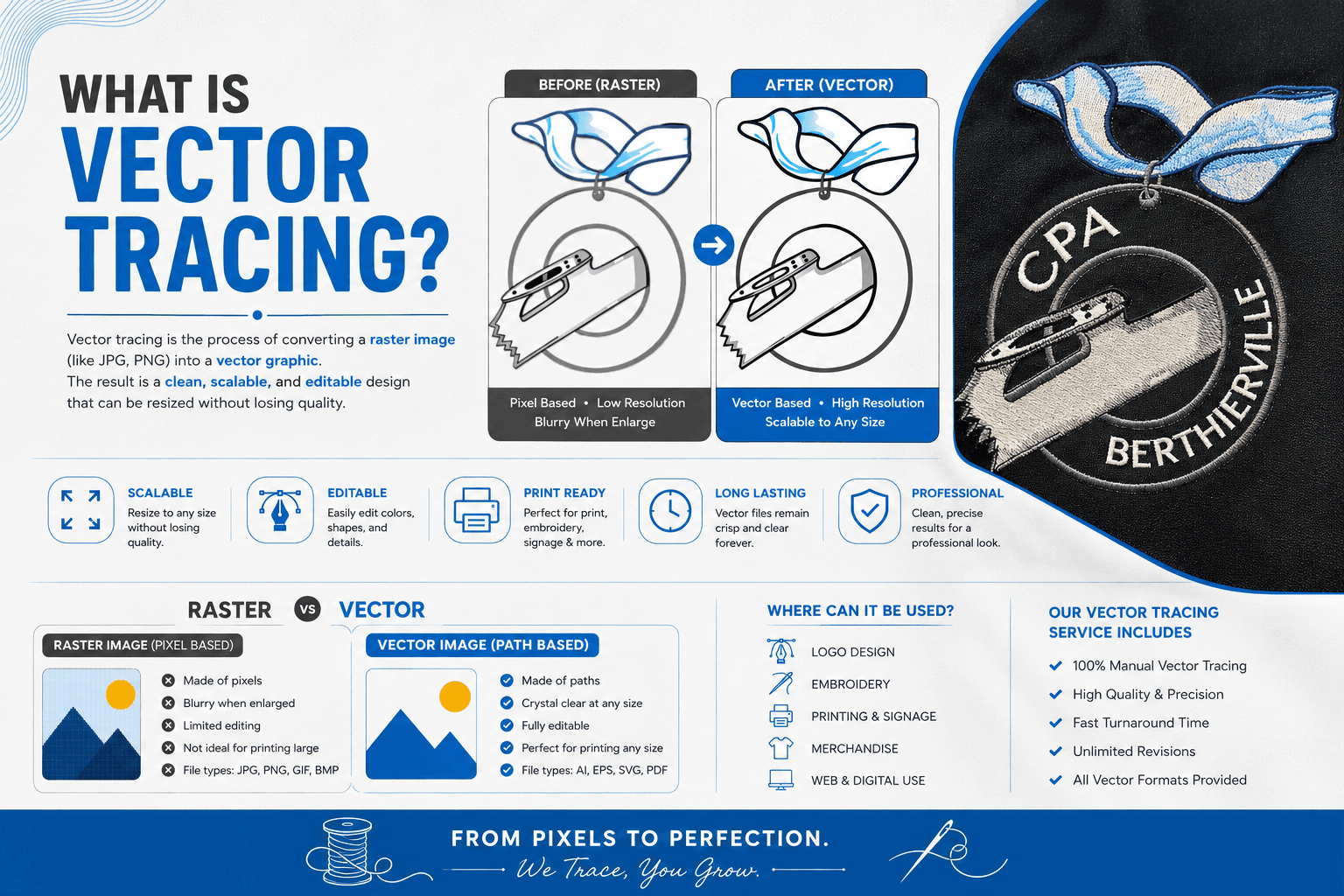
What is vector tracing? It is the process of rebuilding a pixel based image as mathematical paths, so the artwork stays sharp at any size. Vector tracing is why a printer asks for an AI or EPS file instead of the PNG you already have. A PNG has a fixed number of pixels. A traced vector file has none, so it can print on a business card or a billboard from the same source.
Quick answer
Vector tracing, also called vectorization, converts a raster image into vector artwork made of points, paths and curves. A designer can do it by hand with the pen tool, or software can detect the edges automatically. The output scales without blurring, which raster formats like JPG and PNG cannot do.
What Is Vector Tracing?
Every image on your computer is one of two things. A raster image stores a colour value for every pixel in a fixed grid. A vector image stores shapes as equations that the software redraws at whatever size you ask for.
Vector tracing moves an image from the first category into the second. Nobody converts the pixels themselves. Someone rebuilds the shapes instead, either by clicking out points and curves manually or by letting software find the edges.
Vectorization means exactly the same thing. Designers use both terms interchangeably.
Raster And Vector: The Difference That Matters
Enlarge a raster logo past its original size and the software has to invent pixels that were never there. Edges soften, curves turn into staircases and small text goes fuzzy.
A vector circle behaves differently. The file stores it as a centre point and a radius, so the software draws a perfect circle at one inch or at ten feet. Nothing degrades, because no pixel grid existed to begin with.
Common raster formats are JPG, PNG, GIF and WebP. Common vector formats are AI, EPS and SVG. PDF sits awkwardly between the two, since it can carry either kind of data depending on how someone made it.
How Vector Tracing Actually Works
Both routes end with the same kind of file. The gap in quality shows on anything complicated.
Manual tracing means a designer rebuilds the artwork by hand with the pen tool in Illustrator, CorelDRAW or Inkscape, placing anchor points along each edge. It takes longer, though it produces the cleanest result on a small, blurry or badly compressed source.
Automatic tracing hands the job to an algorithm. Illustrator calls it Image Trace. Inkscape calls it Trace Bitmap and runs the open source Potrace engine. Standalone tools such as Vector Magic and VTracer do the same outside a full editor, in seconds rather than hours.
Manual Versus Automatic Vector Tracing
Automatic tracing shines on flat, high contrast artwork. A two colour logo or a black and white icon usually traces almost perfectly, and manual work would only be slower.
It struggles once the image gets busy. Soft gradients, blended colours, drop shadows and photographic detail all force the software to guess where one shape ends. It frequently guesses wrong, which produces jagged edges, merged shapes and hundreds of unnecessary anchor points.
Most professional work is therefore a hybrid. Run an automatic trace for the rough structure, then clean it up by hand. On a badly damaged logo, the pen tool often beats repairing what the algorithm produced.
What Changed In 2026
The tooling moved noticeably this year. Adobe added a feature called Concept to Vector, which turns raster images and unexpanded Image Trace objects into editable vector artwork from a written prompt rather than from edge detection alone. It can also add or remove elements from the original while it generates.
Image Trace itself gained Enhanced Presets alongside the older Legacy Presets. Enhanced presets handle gradients, shapes, transparency and auto grouping automatically, whereas legacy presets required you to tick those options yourself. You can read the current settings on Adobe’s Image Trace documentation.
A wave of AI vectorizers arrived outside Adobe too. They close some of the gap on messy files. None of them removes the review step though, because no tool knows whether the wobble in your logo is a mistake or a design choice.
Which Images Trace Cleanly And Which Do Not
Good candidates share three traits: clear edges, a small number of flat colours and enough resolution to see those edges. Logos, icons, line art, simple illustrations and scanned sketches all qualify.
Photographs are the opposite. A face or a landscape has thousands of subtle colour transitions and no real edges to follow, so a tracer returns either an enormous file or a flat, posterized cartoon. Keep photographic work as a high resolution raster.
Watch the source quality too. A heavily compressed JPG pulled from a website carries artefacts around every edge, and the tracer copies them straight into your paths.
The File Formats To Ask For
AI is Illustrator’s native format and stays fully editable, so keep it as your master. EPS is the old interchange standard and still opens almost everywhere, which makes it the safe choice for printers and suppliers.
SVG targets the web. It stays small, scales on any screen and accepts styling straight from code. PDF is the universal viewer, and a vector PDF prints beautifully, although it is not the format you want to hand someone for editing.
Ask for AI, EPS and a PNG preview together. That covers editing, printing and quick checking in one go.
Vector Tracing Is Not Embroidery Digitizing
This confusion costs people real money, so it is worth being blunt. A traced vector file is still a picture. An embroidery machine cannot read it, cannot stitch it and will not recognise the extension.
Digitizing is a separate craft. It turns artwork into a stitch file such as DST or PES, where a person sets the stitch types, density, underlay, pull compensation and sewing sequence. Vector art helps by giving clean edges to follow, but it is a starting point rather than a shortcut.
You also do not need a vector file to place a digitizing order. A sharp, high resolution raster works fine. Our note on digitizing images for embroidery explains what makes artwork easy to work from, and our guide on how to convert a JPG into an embroidery file covers that route directly.
Mistakes That Ruin A Traced File
- Trusting an automatic trace without checking it. Zoom to two hundred percent and look at the curves before anyone prints anything.
- Starting from a screenshot. Compression artefacts become permanent bumps in the paths.
- Leaving hundreds of anchor points in place. A clean logo needs surprisingly few. Excess points make later edits painful.
- Accepting a fake vector. Some suppliers embed the original raster inside an EPS wrapper. Zoom in. If it still blurs, it was never traced.
- Ordering a vector file when you needed a stitch file. Say what the artwork is actually for.
What Vector Tracing Costs
Price follows complexity rather than file size. A flat two colour logo is quick. A detailed crest with gradients, texture and small lettering takes real hours, since most of it needs rebuilding by hand.
At Fast Digitizer, our vector art and tracing service handles logos, sketches and damaged files, and turnaround is ASAP. Tell us the final use, whether that is print, signage, web or embroidery, since it changes how we build the file. If the artwork is heading for a machine, our custom embroidery digitizing options cover that step instead.
Lost the original file?
Send whatever version you have. We will tell you honestly whether it needs tracing, cleanup or a full rebuild.
Frequently Asked Questions
What does it mean to vectorize an image?
It means rebuilding a pixel based image as mathematical shapes. Vectorize and vector trace describe the same process. The result is artwork made of paths and curves that redraws cleanly at any size.
How do I vectorize my art?
Open it in a vector editor, then trace by hand with the pen tool or run the automatic tracer. Hand tracing wins on messy artwork. Automatic tracing is far quicker on flat, high contrast designs, though it usually needs tidying afterwards.
How to do vector tracing in Illustrator?
Go to File then Place and drop your image on the canvas. Open Window then Image Trace, pick a preset from either the Enhanced or Legacy list, and adjust the sliders until the preview looks right. Click Expand to convert the preview into real editable paths, then clean up any stray points.
How do I know if my image is a vector?
Zoom in hard, to around eight hundred percent. A vector stays crisp at any zoom level, while a raster breaks into visible squares. Check the extension too: AI, EPS and SVG are vector, whereas JPG, PNG and GIF never are.
How can I convert an image to a vector trace?
Run it yourself in Illustrator or Inkscape, use an online vectorizer, or send it to a designer. For anything carrying your brand, have a person review the result. Automatic output looks fine small and falls apart large.
Do I need a vector file before ordering embroidery digitizing?
No. A digitizer can work from a sharp, high resolution raster image. Vector art simply makes the edges easier to follow, which can save cleanup time. It is a convenience rather than a requirement.
About Fast Digitizer. We are a Chicago based studio offering vector art, logo design and embroidery digitizing for businesses across the United States. Our team rebuilds every file by hand and delivers it in the formats you actually need. See our full range of professional embroidery digitizing services or send your artwork for a free quote.